Tags and Elements
Elements are the building blocks of a web page
To create an HTML element, start with an HTML tag and combine it with content and/or attributes.
Opening and closing tags surround content
All tags have angle brackets < > surrounding their name, and most tags come in pairs, including an opening and closing tag:
<p> is an opening tag for a paragraph element.
</p> is a closing tag for the same element. Closing tags need a forward slash / before the tag name.
Here is a complete paragraph element, with opening and closing paragraph tags enclosing text content:
Only the text content that is inside the tags shows up on the page when it is displayed in the browser.
Some tags are self-closing
Certain tags, like the tag that creates an image element on the page, don't need opening and closing tags, because they don't contain text content.
These are called void elements (or empty elements).
Notice that this tag contains information inside of the angle brackets. These are called attributes.
HTML elements can include attributes
Attributes let us include information in the element that is not meant to display on the page, but may be needed for other reasons.
An attribute consists of an attribute name and an attribute value.
For example, the img element above has a src attribute with a value of "lake.jpg". This attribute tells the browser where to find the image to display on the page.
For elements that have both opening and closing tags, attributes belong only in the opening tag and are not repeated in the closing tag.
Attributes have a name and a value. The value has to be in double-quotation marks. The attribute is set to its value with an equals sign.
Anatomy of an element
Knowing how to create an HTML element is the first step in building a whole page.
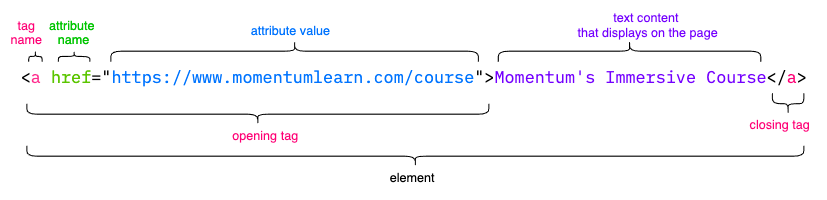
Now that you've seen all the parts of a single element, you're ready to start putting them together.